PennySteady Debt Payoff Planner
A debt payoff plan built on what you can actually pay each month.
A spreadsheet planner for Excel. Compare snowball and avalanche side by side and see an estimated payoff date. The full version also logs one-time extra payments that stay one-time. No account, no bank login, no subscription.
Free Lite edition now — paid version not on sale yet; join the launch list.
- Works in desktop Excel
- No bank or lender connection
- Results are estimates from your numbers
Sound familiar?
- You make one extra payment, and the planner quietly repeats it every month after.
- A “free” trial asks for your card up front, or simple payoff math turns into a monthly subscription.
- You can’t tell which method fits your numbers, because the app shows only one of them.
What it does
-
1
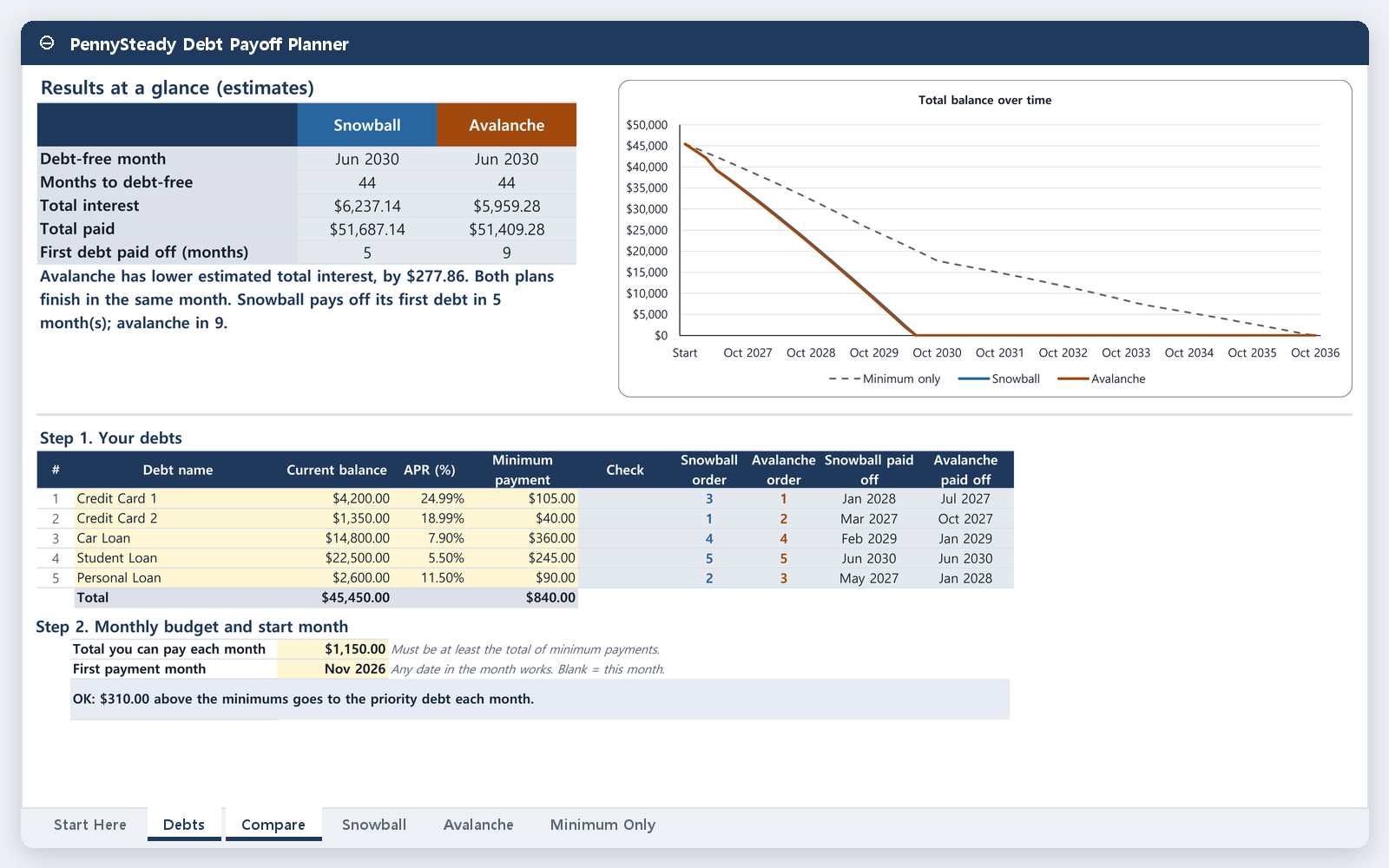
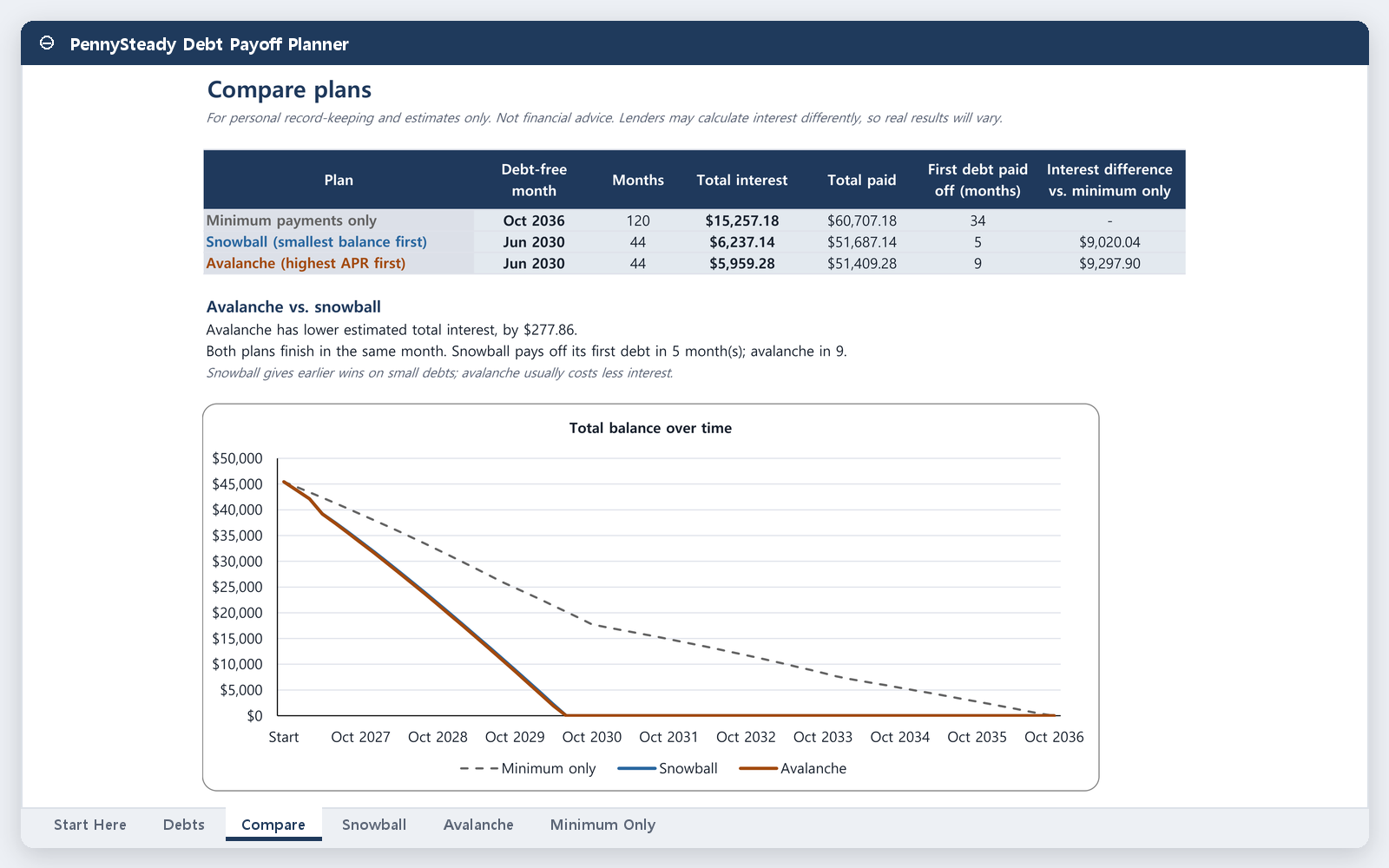
Snowball and avalanche, side by side
Enter your debts once and see both methods next to each other: estimated payoff date, number of months, and total interest for each. Switch methods without starting over.
-
2
One-time extras stay one-time (full version)
Your monthly budget and one-time extra payments are entered separately. A one-time extra is applied once and does not roll into future months unless you add it again.
-
3
Private and portable
No account and no bank connection. Everything lives in your own file, so you can keep a copy, back it up, or print it.
See the sheet
Screens show the full version, which is not on sale yet. The free Lite edition has up to 3 debts, with no balance chart and no one-time extra payments.
Try it free and hear about the launch
Free Lite edition now — paid version not on sale yet; join the launch list.
Free now
Free Lite edition
The Lite edition is a smaller version of the planner that you can try right now: up to 3 debts and a 10-year schedule, with snowball, avalanche, and a minimum-payments-only baseline side by side. It’s free.
The full version is planned to add up to 10 debts, one-time extra payments, a 30-year schedule, a balance chart, and a printable how-to guide.
Get the free Lite editionPlanned launch price
Not on sale yet. There is no checkout, and we are not taking payments or preorders. The final price and terms will be posted at launch.
Tell us how you track your debt today and what you’d pay. If you’d like a single email when the full version launches, you can leave your address. It’s optional.
Get the launch notice (2-minute survey)FAQ
Does it work in Excel?
Yes. You get one .xlsx file that works in desktop Excel. Try the free Lite edition first to check it on your setup.
Do I need an account?
You don’t need an account with us, and nothing extra is needed to open the file in Excel.
Where is my data stored?
Only in your own copy of the file, wherever you save it. We can’t see your balances, and the sheet doesn’t connect to any bank or lender.
How exact are the numbers?
They’re estimates based on what you enter: balances, interest rates, minimum payments, and extra payments. Your lender’s statement is the final word, since lenders can calculate interest in different ways.
What about refunds?
Nothing is for sale yet. Purchase terms, including refunds, will be posted on this page before the full version goes on sale.
Is this financial advice?
No. It’s a record-keeping and calculation tool. It works with the numbers you type in.