PennySteady Checkbook Register
A checkbook register that keeps its totals honest.
A spreadsheet register for Excel. Enter each transaction once, match it to your statement, and see a running balance for every account. No bank login, no ads, no subscription.
Free Lite edition now — paid version not on sale yet; join the launch list.
- Works in desktop Excel
- No bank connection
- Your data stays in your own file
Sound familiar?
- Your balance drifts by a few cents from month to month, and you can’t find where it went.
- You record a transfer twice, once for each account, and then edit only one side.
- An app update wipes out years of entries, or a “free” register starts demanding a monthly fee.
What it does
-
1
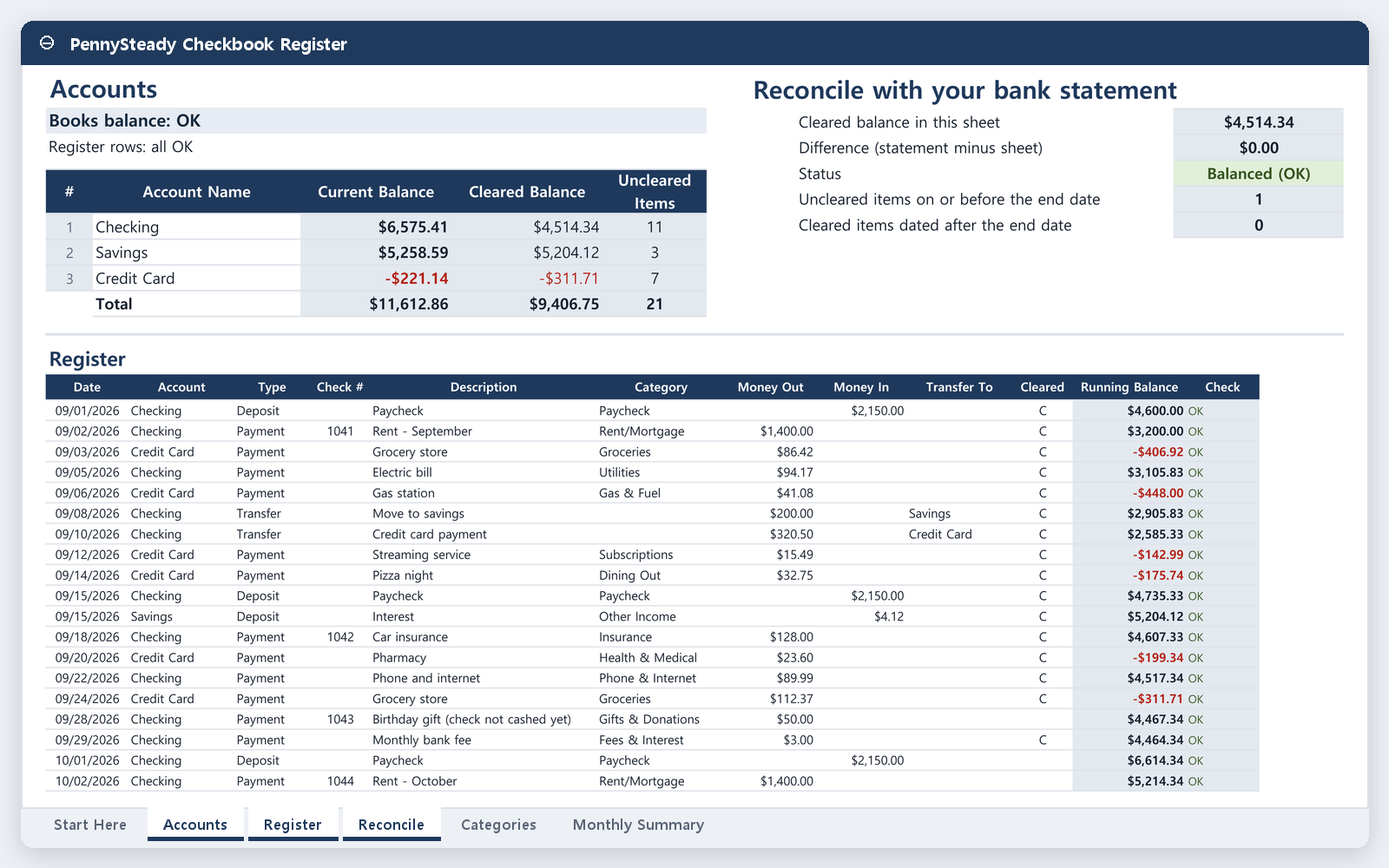
A running balance for each account
Every entry shows the balance right after it, account by account, so you can see exactly where a number changed.
-
2
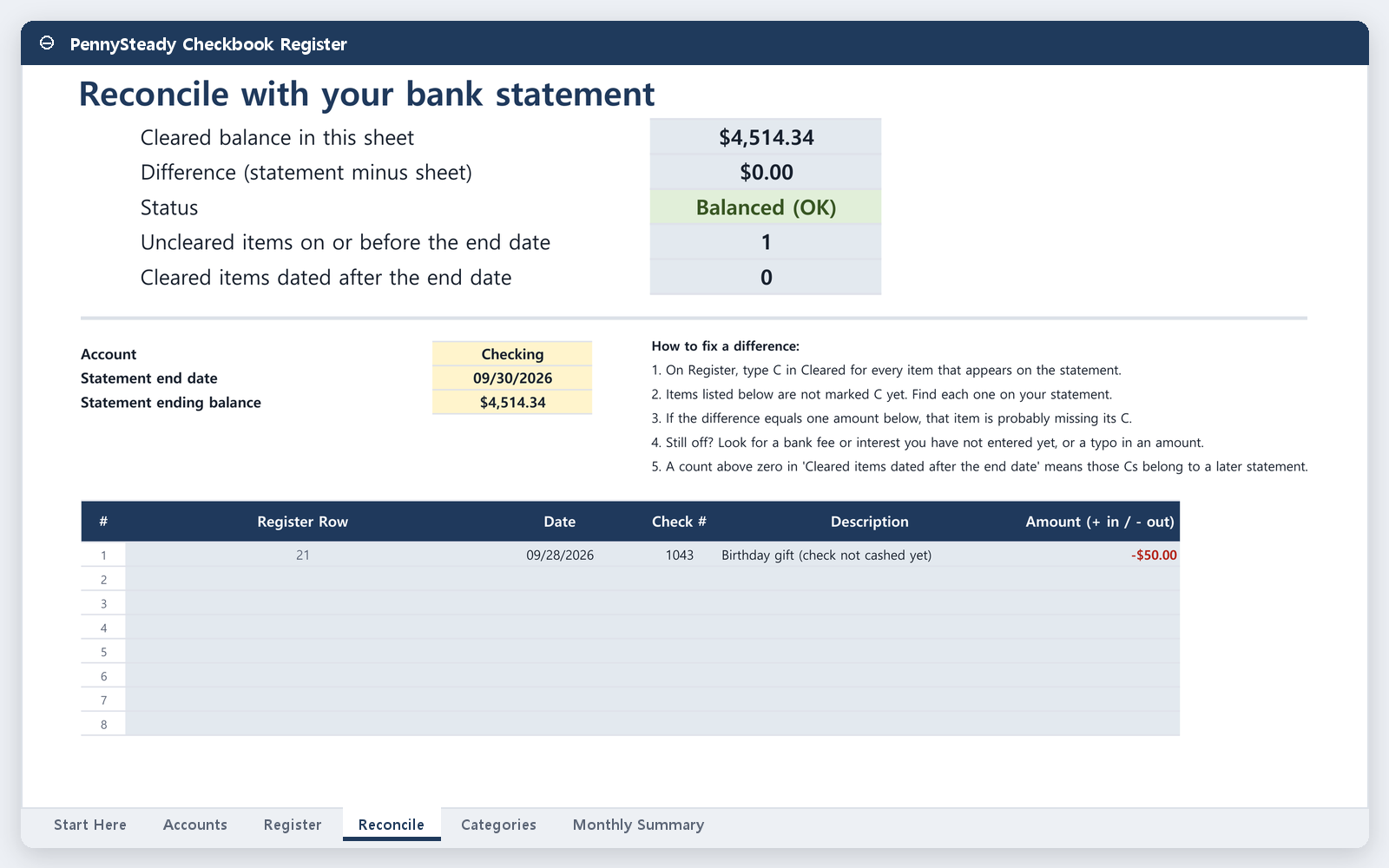
Statement matching
Mark items as cleared as they show up on your statement. The sheet shows the difference between your statement balance and your cleared balance until it reads $0.00.
-
3
One-line transfers
Type a transfer once, choosing the “from” and “to” accounts, and both account balances update. Fix it in one place, and both sides change.
-
4
A built-in totals check
The sheet cross-checks its own totals and flags any mismatch, so a broken formula or an incomplete row stands out instead of hiding.
Plain words throughout: “Money in” and “Money out,” not debits and credits.
See the sheet
Screens show the full version, which is not on sale yet. The free Lite edition has 2 accounts and 150 register rows, with no monthly summary.
Try it free and hear about the launch
Free Lite edition now — paid version not on sale yet; join the launch list.
Free now
Free Lite edition
The Lite edition is a smaller version of the register that you can try right now: 2 accounts and 150 register rows, with running balances, statement matching, one-line transfers, and the totals check. It’s free.
The full version is planned to add up to 10 accounts, 2,000 rows, and a monthly summary by category.
Get the free Lite editionPlanned launch price
Not on sale yet. There is no checkout, and we are not taking payments or preorders. The final price and terms will be posted at launch.
Tell us how you keep track today and what you’d pay. If you’d like a single email when the full version launches, you can leave your address. It’s optional.
Get the launch notice (2-minute survey)FAQ
Does it work in Excel?
Yes. You get one .xlsx file that works in desktop Excel. Try the free Lite edition first to check it on your setup.
Do I need an account?
You don’t need an account with us, and nothing extra is needed to open the file in Excel.
Where is my data stored?
Only in your own copy of the file, wherever you save it. We can’t see it, and the sheet doesn’t connect to your bank.
What about refunds?
Nothing is for sale yet. Purchase terms, including refunds, will be posted on this page before the full version goes on sale.
Is this financial advice?
No. It’s a record-keeping and calculation tool. It works with the numbers you type in.